2.4. Data Sets
A data set, implemented with the vtkm::cont::DataSet class,
contains and manages the geometric data structures that VTK‑m operates on.
-
class DataSet
Contains and manages the geometric data structures that VTK-m operates on.
A
DataSetis the main data structure used by VTK-m to pass data in and out of filters, rendering, and other components. A data set comprises the following 3 data structures.CellSet A cell set describes topological connections. A cell set defines some number of points in space and how they connect to form cells, filled regions of space. A data set has exactly one cell set.
Field A field describes numerical data associated with the topological elements in a cell set. The field is represented as an array, and each entry in the field array corresponds to a topological element (point, edge, face, or cell). Together the cell set topology and discrete data values in the field provide an interpolated function throughout the volume of space covered by the data set. A cell set can have any number of fields.
CoordinateSystem A coordinate system is a special field that describes the physical location of the points in a data set. Although it is most common for a data set to contain a single coordinate system, VTK-m supports data sets with no coordinate system such as abstract data structures like graphs that might not have positions in a space.
DataSetalso supports multiple coordinate systems for data that have multiple representations for position. For example, geospatial data could simultaneously have coordinate systems defined by 3D position, latitude-longitude, and any number of 2D projections.
In addition to the base vtkm::cont::DataSet, VTK‑m provides vtkm::cont::PartitionedDataSet to represent data partitioned into multiple domains.
A vtkm::cont::PartitionedDataSet is implemented as a collection of vtkm::cont::DataSet objects.
Partitioned data sets are described later in Section 2.4.5 (Partitioned Data Sets).
As will be seen throughout this chapter, there is a lot of variability in the structure that can be represented in a vtkm::cont::DataSet.
To get a human-readable synopsis of its contents, use the vtkm::cont::DataSet::PrintSummary() method.
This is particularly helpful for debugging.
The vtkm::cont::DataSet::PrintSummary() method takes a C++ output stream to direct the description.
Usually std::cout is provided to direct the output to the terminal.
1 dataSet.PrintSummary(std::cout);
2.4.1. Building Data Sets
Before we go into detail on the cell sets, fields, and coordinate systems that make up a data set in VTK‑m, let us first discuss how to build a data set. One simple way to build a data set is to load data from a file using the vtkm::io module. Reading files is discussed in detail in Chapter 2.5 (File I/O).
This section describes building data sets of different types using a set of
classes named DataSetBuilder*, which provide a convenience layer
on top of vtkm::cont::DataSet to make it easier to create data sets.
Did You Know?
To simplify the introduction of vtkm::cont::DataSet objects, this section uses the simplest mechanisms.
In many cases this involves loading data in a std::vector and passing that to VTK‑m, which usually causes the data to be copied.
This is not the most efficient method to load data into VTK‑m.
Although it is sufficient for small data or data that come from a “slow” source, such as a file, it might be a bottleneck for large data generated by another library.
It is possible to adapt VTK‑m’s vtkm::cont::DataSet to externally defined data.
This is done by wrapping existing data into what is called ArrayHandle, but this is a more advanced topic that will not be addressed in this chapter.
ArrayHandle objects are introduced in Chapter 3.2 (Basic Array Handles) and more adaptive techniques are described in later chapters.
2.4.1.1. Creating Uniform Grids
Uniform grids are meshes that have a regular array structure with points uniformly spaced parallel to the axes. Uniform grids are also sometimes called regular grids or images.
The vtkm::cont::DataSetBuilderUniform class can be used to easily create 2- or 3-dimensional uniform grids.
vtkm::cont::DataSetBuilderUniform has several versions of a method named vtkm::cont::DataSetBuilderUniform::Create() that takes the number of points in each dimension, the origin, and the spacing.
The origin is the location of the first point of the data (in the lower left corner), and the spacing is the distance between points in the x, y, and z directions.
-
class DataSetBuilderUniform
Public Static Functions
-
template<typename T>
static inline vtkm::cont::DataSet Create(const vtkm::Id &dimension, const T &origin, const T &spacing, const std::string &coordNm = "coords") Create a 1D uniform
DataSet.- Parameters:
dimension – [in] The size of the grid. The dimensions are specified based on the number of points (as opposed to the number of cells).
origin – [in] The origin of the data. This is the point coordinate with the minimum value in all dimensions.
spacing – [in] The uniform distance between adjacent points.
coordNm – [in] (optional) The name to register the coordinates as.
-
static vtkm::cont::DataSet Create(const vtkm::Id &dimension, const std::string &coordNm = "coords")
Create a 1D uniform
DataSet.The origin is set to 0 and the spacing is set to 1.
- Parameters:
dimension – [in] The size of the grid. The dimensions are specified based on the number of points (as opposed to the number of cells).
coordNm – [in] (optional) The name to register the coordinates as.
-
template<typename T>
static inline vtkm::cont::DataSet Create(const vtkm::Id2 &dimensions, const vtkm::Vec<T, 2> &origin, const vtkm::Vec<T, 2> &spacing, const std::string &coordNm = "coords") Create a 2D uniform
DataSet.- Parameters:
dimensions – [in] The size of the grid. The dimensions are specified based on the number of points (as opposed to the number of cells).
origin – [in] The origin of the data. This is the point coordinate with the minimum value in all dimensions.
spacing – [in] The uniform distance between adjacent points.
coordNm – [in] (optional) The name to register the coordinates as.
-
static vtkm::cont::DataSet Create(const vtkm::Id2 &dimensions, const std::string &coordNm = "coords")
Create a 2D uniform
DataSet.The origin is set to (0,0) and the spacing is set to (1,1).
- Parameters:
dimensions – [in] The size of the grid. The dimensions are specified based on the number of points (as opposed to the number of cells).
coordNm – [in] (optional) The name to register the coordinates as.
-
template<typename T>
static inline vtkm::cont::DataSet Create(const vtkm::Id3 &dimensions, const vtkm::Vec<T, 3> &origin, const vtkm::Vec<T, 3> &spacing, const std::string &coordNm = "coords") Create a 3D uniform
DataSet.- Parameters:
dimensions – [in] The size of the grid. The dimensions are specified based on the number of points (as opposed to the number of cells).
origin – [in] The origin of the data. This is the point coordinate with the minimum value in all dimensions.
spacing – [in] The uniform distance between adjacent points.
coordNm – [in] (optional) The name to register the coordinates as.
-
static vtkm::cont::DataSet Create(const vtkm::Id3 &dimensions, const std::string &coordNm = "coords")
Create a 3D uniform
DataSet.The origin is set to (0,0,0) and the spacing is set to (1,1,1).
- Parameters:
dimensions – [in] The size of the grid. The dimensions are specified based on the number of points (as opposed to the number of cells).
coordNm – [in] (optional) The name to register the coordinates as.
-
template<typename T>
The following example creates a vtkm::cont::DataSet containing a uniform grid of \(101 \times 101 \times 26\) points.
1  vtkm::cont::DataSetBuilderUniform dataSetBuilder;
2
3  vtkm::cont::DataSet dataSet = dataSetBuilder.Create(vtkm::Id3(101, 101, 26));
If not specified, the origin will be at the coordinates \((0,0,0)\) and the spacing will be \(1\) in each direction. Thus, in the previous example the width, height, and depth of the mesh in physical space will be \(100\), \(100\), and :math`25`, respectively, and the mesh will be centered at \((50, 50, 12.5)\). Let us say we actually want a mesh of the same dimensions, but we want the \(z\) direction to be stretched out so that the mesh will be the same size in each direction, and we want the mesh centered at the origin.
1  vtkm::cont::DataSetBuilderUniform dataSetBuilder;
2
3  vtkm::cont::DataSet dataSet = dataSetBuilder.Create(vtkm::Id3(101, 101, 26),
4                                                      vtkm::Vec3f(-50.0, -50.0, -50.0),
5                                                      vtkm::Vec3f(1.0, 1.0, 4.0));
2.4.1.2. Creating Rectilinear Grids
A rectilinear grid is similar to a uniform grid except that a rectilinear grid can adjust the spacing between adjacent grid points. This allows the rectilinear grid to have tighter sampling in some areas of space, but the points are still constrained to be aligned with the axes and each other. The irregular spacing of a rectilinear grid is specified by providing a separate array each for the x, y, and z coordinates.
The vtkm::cont::DataSetBuilderRectilinear class can be used to easily create
2- or 3-dimensional rectilinear grids.
vtkm::cont::DataSetBuilderRectilinear has several versions of a method
named vtkm::cont::DataSetBuilderRectilinear::Create() that takes these coordinate arrays and builds a
vtkm::cont::DataSet out of them. The arrays can be supplied as either
standard C arrays or as std::vector objects, in which case the
data in the arrays are copied into the vtkm::cont::DataSet. These
arrays can also be passed as vtkm::cont::ArrayHandle objects (introduced later in this book), in which
case the data are shallow copied.
-
class DataSetBuilderRectilinear
Public Static Functions
-
template<typename T>
static inline vtkm::cont::DataSet Create(const std::vector<T> &xvals, const std::string &coordNm = "coords") Create a 1D retilinear
DataSet.A rectilinear grid is specified with a scalar array for the point coordinates in the x direction. In this form, the coordinate array is specified with
std::vector. The data is copied from thestd::vector.- Parameters:
xvals – [in] An array of coordinates to use along the x dimension.
coordNm – [in] (optional) The name to register the coordinates as.
-
template<typename T>
static inline vtkm::cont::DataSet Create(vtkm::Id nx, T *xvals, const std::string &coordNm = "coords") Create a 1D retilinear
DataSet.A rectilinear grid is specified with a scalar array for the point coordinates in the x direction. In this form, the coordinate array is specified with a standard C array. The data is copied from the array.
- Parameters:
nx – [in] The size of the grid in the x direction (and length of the xvals array).
xvals – [in] An array of coordinates to use along the x dimension.
coordNm – [in] (optional) The name to register the coordinates as.
-
template<typename T>
static inline vtkm::cont::DataSet Create(const vtkm::cont::ArrayHandle<T> &xvals, const std::string &coordNm = "coords") Create a 1D retilinear
DataSet.A rectilinear grid is specified with a scalar array for the point coordinates in the x direction. In this form, the coordinate array is specified with
vtkm::cont::ArrayHandle. TheArrayHandleis shared with theDataSet, so changing theArrayHandlechanges theDataSet.- Parameters:
xvals – [in] An array of coordinates to use along the x dimension.
coordNm – [in] (optional) The name to register the coordinates as.
-
template<typename T>
static inline vtkm::cont::DataSet Create(const std::vector<T> &xvals, const std::vector<T> &yvals, const std::string &coordNm = "coords") Create a 2D retilinear
DataSet.A rectilinear grid is specified with separate arrays for the point coordinates in the x and y directions. In this form, the coordinate arrays are specified with
std::vector. The data is copied from thestd::vectors.- Parameters:
xvals – [in] An array of coordinates to use along the x dimension.
yvals – [in] An array of coordinates to use along the x dimension.
coordNm – [in] (optional) The name to register the coordinates as.
-
template<typename T>
static inline vtkm::cont::DataSet Create(vtkm::Id nx, vtkm::Id ny, T *xvals, T *yvals, const std::string &coordNm = "coords") Create a 2D retilinear
DataSet.A rectilinear grid is specified with separate arrays for the point coordinates in the x and y directions. In this form, the coordinate arrays are specified with standard C arrays. The data is copied from the arrays.
- Parameters:
nx – [in] The size of the grid in the x direction (and length of the xvals array).
ny – [in] The size of the grid in the x direction (and length of the yvals array).
xvals – [in] An array of coordinates to use along the x dimension.
yvals – [in] An array of coordinates to use along the x dimension.
coordNm – [in] (optional) The name to register the coordinates as.
-
template<typename T>
static inline vtkm::cont::DataSet Create(const vtkm::cont::ArrayHandle<T> &xvals, const vtkm::cont::ArrayHandle<T> &yvals, const std::string &coordNm = "coords") Create a 2D retilinear
DataSet.A rectilinear grid is specified with separate arrays for the point coordinates in the x and y directions. In this form, the coordinate arrays are specified with
vtkm::cont::ArrayHandle. TheArrayHandles are shared with theDataSet, so changing theArrayHandles changes theDataSet.- Parameters:
xvals – [in] An array of coordinates to use along the x dimension.
yvals – [in] An array of coordinates to use along the x dimension.
coordNm – [in] (optional) The name to register the coordinates as.
-
template<typename T>
static inline vtkm::cont::DataSet Create(vtkm::Id nx, vtkm::Id ny, vtkm::Id nz, T *xvals, T *yvals, T *zvals, const std::string &coordNm = "coords") Create a 3D retilinear
DataSet.A rectilinear grid is specified with separate arrays for the point coordinates in the x, y, and z directions. In this form, the coordinate arrays are specified with standard C arrays. The data is copied from the arrays.
- Parameters:
nx – [in] The size of the grid in the x direction (and length of the xvals array).
ny – [in] The size of the grid in the x direction (and length of the yvals array).
nz – [in] The size of the grid in the x direction (and length of the zvals array).
xvals – [in] An array of coordinates to use along the x dimension.
yvals – [in] An array of coordinates to use along the x dimension.
zvals – [in] An array of coordinates to use along the x dimension.
coordNm – [in] (optional) The name to register the coordinates as.
-
template<typename T>
static inline vtkm::cont::DataSet Create(const std::vector<T> &xvals, const std::vector<T> &yvals, const std::vector<T> &zvals, const std::string &coordNm = "coords") Create a 3D retilinear
DataSet.A rectilinear grid is specified with separate arrays for the point coordinates in the x, y, and z directions. In this form, the coordinate arrays are specified with
std::vector. The data is copied from thestd::vectors.- Parameters:
xvals – [in] An array of coordinates to use along the x dimension.
yvals – [in] An array of coordinates to use along the x dimension.
zvals – [in] An array of coordinates to use along the x dimension.
coordNm – [in] (optional) The name to register the coordinates as.
-
template<typename T>
static inline vtkm::cont::DataSet Create(const vtkm::cont::ArrayHandle<T> &xvals, const vtkm::cont::ArrayHandle<T> &yvals, const vtkm::cont::ArrayHandle<T> &zvals, const std::string &coordNm = "coords") Create a 3D retilinear
DataSet.A rectilinear grid is specified with separate arrays for the point coordinates in the x, y, and z directions. In this form, the coordinate arrays are specified with
vtkm::cont::ArrayHandle. TheArrayHandles are shared with theDataSet, so changing theArrayHandles changes theDataSet.- Parameters:
xvals – [in] An array of coordinates to use along the x dimension.
yvals – [in] An array of coordinates to use along the x dimension.
zvals – [in] An array of coordinates to use along the x dimension.
coordNm – [in] (optional) The name to register the coordinates as.
-
template<typename T>
The following example creates a vtkm::cont::DataSet containing a rectilinear
grid with \(201 \times 201 \times 101\) points with different irregular
spacing along each axis.
 1  // Make x coordinates range from -4 to 4 with tighter spacing near 0.
 2  std::vector<vtkm::Float32> xCoordinates;
 3  for (vtkm::Float32 x = -2.0f; x <= 2.0f; x += 0.02f)
 4  {
 5    xCoordinates.push_back(vtkm::CopySign(x * x, x));
 6  }
 7
 8  // Make y coordinates range from 0 to 2 with tighter spacing near 2.
 9  std::vector<vtkm::Float32> yCoordinates;
10  for (vtkm::Float32 y = 0.0f; y <= 4.0f; y += 0.02f)
11  {
12    yCoordinates.push_back(vtkm::Sqrt(y));
13  }
14
15  // Make z coordinates rangefrom -1 to 1 with even spacing.
16  std::vector<vtkm::Float32> zCoordinates;
17  for (vtkm::Float32 z = -1.0f; z <= 1.0f; z += 0.02f)
18  {
19    zCoordinates.push_back(z);
20  }
21
22  vtkm::cont::DataSetBuilderRectilinear dataSetBuilder;
23
24  vtkm::cont::DataSet dataSet =
25    dataSetBuilder.Create(xCoordinates, yCoordinates, zCoordinates);
2.4.1.3. Creating Explicit Meshes
An explicit mesh is an arbitrary collection of cells with arbitrary connections.
It can have multiple different types of cells.
Explicit meshes are also known as unstructured grids.
Explicit meshes can contain cells of different shapes.
The shapes that VTK‑m currently supports are listed in Figure 2.1.
Each shape is identified using either a numeric identifier, provided by VTK‑m with identifiers of the form vtkm::CELL_SHAPE_* or special tag structures of the form vtkm::CellSetTag*.
Cell shapes are discussed in detail in Chapter 4.7 (Working with Cells).

Figure 2.1 Basic Cell Shapes.

Figure 2.2 An example explicit mesh.
The cells of an explicit mesh are defined with the following 3 arrays, which are depicted graphically in Figure 2.2.
- Shapes
An array of ids identifying the shape of the cell. Each value is a
vtkm::UInt8and should be set to one of thevtkm::CELL_SHAPE_*constants. The shapes and their identifiers are shown in Figure 2.1. The size of this array is equal to the number of cells in the set.
- Connectivity
An array that lists all the points that comprise each cell. Each entry in the array is a
vtkm::Idgiving the point id associated with a vertex of a cell. The points for each cell are given in a prescribed order for each shape, which is also shown in Figure 2.1. The point indices are stored consecutively from the first cell to the last.
- Offsets
An array of
vtkm::Id’s pointing to the index in the connectivity array where the points for a particular cell starts. The size of this array is equal to the number of cells in the set plus 1. The first entry is expected to be 0 (since the connectivity of the first cell is at the start of the connectivity array). The last entry, which does not correspond to any cell, should be the size of the connectivity array.
One important item that is missing from this list of arrays is a count of the number of indices associated with each cell. This is not explicitly represented in VTK‑m’s mesh structure because it can be implicitly derived from the offsets array by subtracting consecutive entries. However, it is usually the case when building an explicit mesh that you will have an array of these counts rather than the offsets. It is for this reason that VTK‑m contains mechanisms to build an explicit data set with a “num indices” arrays rather than an offsets array.
The vtkm::cont::DataSetBuilderExplicit class can be used to create data sets with explicit meshes.
vtkm::cont::DataSetBuilderExplicit has several versions of a method named vtkm::cont::DataSetBuilderExplicit::Create().
Generally, these methods take the shapes, number of indices, and connectivity arrays as well as an array of point coordinates.
-
class DataSetBuilderExplicit
Public Static Functions
-
template<typename T>
static inline vtkm::cont::DataSet Create(const std::vector<T> &xVals, const std::vector<vtkm::UInt8> &shapes, const std::vector<vtkm::IdComponent> &numIndices, const std::vector<vtkm::Id> &connectivity, const std::string &coordsNm = "coords") Create a 1D
DataSetwith arbitrary cell connectivity.The cell connectivity is specified with arrays defining the shape and point connections of each cell. In this form, the cell connectivity and coordinates are specified as
std::vectorand the data will be copied to create the data object.- Parameters:
xVals – [in] An array providing the x coordinate of each point.
shapes – [in] An array of shapes for each cell. Each entry should be one of the
vtkm::CELL_SHAPE_*values identifying the shape of the corresponding cell.numIndices – [in] An array containing for each cell the number of points incident on that cell.
connectivity – [in] An array specifying for each cell the indicies of points incident on each cell. Each cell has a short array of indices that reference points in the coords array. The length of each of these short arrays is specified by the numIndices array. These variable length arrays are tightly packed together in this connectivity array.
coordsNm – [in] (optional) The name to register the coordinates as.
-
template<typename T>
static inline vtkm::cont::DataSet Create(const std::vector<T> &xVals, const std::vector<T> &yVals, const std::vector<vtkm::UInt8> &shapes, const std::vector<vtkm::IdComponent> &numIndices, const std::vector<vtkm::Id> &connectivity, const std::string &coordsNm = "coords") Create a 2D
DataSetwith arbitrary cell connectivity.The cell connectivity is specified with arrays defining the shape and point connections of each cell. In this form, the cell connectivity and coordinates are specified as
std::vectorand the data will be copied to create the data object.- Parameters:
xVals – [in] An array providing the x coordinate of each point.
yVals – [in] An array providing the x coordinate of each point.
shapes – [in] An array of shapes for each cell. Each entry should be one of the
vtkm::CELL_SHAPE_*values identifying the shape of the corresponding cell.numIndices – [in] An array containing for each cell the number of points incident on that cell.
connectivity – [in] An array specifying for each cell the indicies of points incident on each cell. Each cell has a short array of indices that reference points in the coords array. The length of each of these short arrays is specified by the numIndices array. These variable length arrays are tightly packed together in this connectivity array.
coordsNm – [in] (optional) The name to register the coordinates as.
-
template<typename T>
static inline vtkm::cont::DataSet Create(const std::vector<T> &xVals, const std::vector<T> &yVals, const std::vector<T> &zVals, const std::vector<vtkm::UInt8> &shapes, const std::vector<vtkm::IdComponent> &numIndices, const std::vector<vtkm::Id> &connectivity, const std::string &coordsNm = "coords") Create a 3D
DataSetwith arbitrary cell connectivity.The cell connectivity is specified with arrays defining the shape and point connections of each cell. In this form, the cell connectivity and coordinates are specified as
std::vectorand the data will be copied to create the data object.- Parameters:
xVals – [in] An array providing the x coordinate of each point.
yVals – [in] An array providing the x coordinate of each point.
zVals – [in] An array providing the x coordinate of each point.
shapes – [in] An array of shapes for each cell. Each entry should be one of the
vtkm::CELL_SHAPE_*values identifying the shape of the corresponding cell.numIndices – [in] An array containing for each cell the number of points incident on that cell.
connectivity – [in] An array specifying for each cell the indicies of points incident on each cell. Each cell has a short array of indices that reference points in the coords array. The length of each of these short arrays is specified by the numIndices array. These variable length arrays are tightly packed together in this connectivity array.
coordsNm – [in] (optional) The name to register the coordinates as.
-
template<typename T>
static inline vtkm::cont::DataSet Create(const std::vector<vtkm::Vec<T, 3>> &coords, const std::vector<vtkm::UInt8> &shapes, const std::vector<vtkm::IdComponent> &numIndices, const std::vector<vtkm::Id> &connectivity, const std::string &coordsNm = "coords") Create a 3D
DataSetwith arbitrary cell connectivity.The cell connectivity is specified with arrays defining the shape and point connections of each cell. In this form, the cell connectivity and coordinates are specified as
std::vectorand the data will be copied to create the data object.- Parameters:
coords – [in] An array of point coordinates.
shapes – [in] An array of shapes for each cell. Each entry should be one of the
vtkm::CELL_SHAPE_*values identifying the shape of the corresponding cell.numIndices – [in] An array containing for each cell the number of points incident on that cell.
connectivity – [in] An array specifying for each cell the indicies of points incident on each cell. Each cell has a short array of indices that reference points in the coords array. The length of each of these short arrays is specified by the numIndices array. These variable length arrays are tightly packed together in this connectivity array.
coordsNm – [in] (optional) The name to register the coordinates as.
-
template<typename T>
static inline vtkm::cont::DataSet Create(const vtkm::cont::ArrayHandle<vtkm::Vec<T, 3>> &coords, const vtkm::cont::ArrayHandle<vtkm::UInt8> &shapes, const vtkm::cont::ArrayHandle<vtkm::IdComponent> &numIndices, const vtkm::cont::ArrayHandle<vtkm::Id> &connectivity, const std::string &coordsNm = "coords") Create a 3D
DataSetwith arbitrary cell connectivity.The cell connectivity is specified with arrays defining the shape and point connections of each cell. In this form, the cell connectivity and coordinates are specified as
ArrayHandleand the memory will be shared with the created data object. That said, theDataSetconstruction will generate a new array for offsets.- Parameters:
coords – [in] An array of point coordinates.
shapes – [in] An array of shapes for each cell. Each entry should be one of the
vtkm::CELL_SHAPE_*values identifying the shape of the corresponding cell.numIndices – [in] An array containing for each cell the number of points incident on that cell.
connectivity – [in] An array specifying for each cell the indicies of points incident on each cell. Each cell has a short array of indices that reference points in the coords array. The length of each of these short arrays is specified by the numIndices array. These variable length arrays are tightly packed together in this connectivity array.
coordsNm – [in] (optional) The name to register the coordinates as.
-
template<typename T, typename CellShapeTag>
static inline vtkm::cont::DataSet Create(const std::vector<vtkm::Vec<T, 3>> &coords, CellShapeTag tag, vtkm::IdComponent numberOfPointsPerCell, const std::vector<vtkm::Id> &connectivity, const std::string &coordsNm = "coords") Create a 3D
DataSetwith arbitrary cell connectivity for a single cell type.The cell connectivity is specified with an array defining the point connections of each cell. All the cells in the
DataSetare of the same shape and contain the same number of incident points. In this form, the cell connectivity and coordinates are specified asstd::vectorand the data will be copied to create the data object.- Parameters:
coords – [in] An array of point coordinates.
tag – [in] A tag object representing the shape of all the cells in the mesh. Cell shape tag objects have a name of the form
vtkm::CellShapeTag*such asvtkm::CellShapeTagTriangleorvtkm::CellShapeTagHexahedron. To specify a cell shape determined at runtime, usevtkm::CellShapeTagGeneric.numberOfPointsPerCell – [in] The number of points that are incident to each cell.
connectivity – [in] An array specifying for each cell the indicies of points incident on each cell. Each cell has a short array of indices that reference points in the coords array. The length of each of these short arrays is specified by numberOfPointsPerCell. These short arrays are tightly packed together in this connectivity array.
coordsNm – [in] (optional) The name to register the coordinates as.
-
template<typename T, typename CellShapeTag>
static inline vtkm::cont::DataSet Create(const vtkm::cont::ArrayHandle<vtkm::Vec<T, 3>> &coords, CellShapeTag tag, vtkm::IdComponent numberOfPointsPerCell, const vtkm::cont::ArrayHandle<vtkm::Id> &connectivity, const std::string &coordsNm = "coords") Create a 3D
DataSetwith arbitrary cell connectivity for a single cell type.The cell connectivity is specified with an array defining the point connections of each cell. All the cells in the
DataSetare of the same shape and contain the same number of incident points. In this form, the cell connectivity and coordinates are specified asArrayHandleand the memory will be shared with the created data object.- Parameters:
coords – [in] An array of point coordinates.
tag – [in] A tag object representing the shape of all the cells in the mesh. Cell shape tag objects have a name of the form
vtkm::CellShapeTag*such asvtkm::CellShapeTagTriangleorvtkm::CellShapeTagHexahedron. To specify a cell shape determined at runtime, usevtkm::CellShapeTagGeneric.numberOfPointsPerCell – [in] The number of points that are incident to each cell.
connectivity – [in] An array specifying for each cell the indicies of points incident on each cell. Each cell has a short array of indices that reference points in the coords array. The length of each of these short arrays is specified by numberOfPointsPerCell. These short arrays are tightly packed together in this connectivity array.
coordsNm – [in] (optional) The name to register the coordinates as.
-
template<typename T>
The following example creates a mesh like the one shown in Figure 2.2.
 1  // Array of point coordinates.
 2  std::vector<vtkm::Vec3f_32> pointCoordinates;
 3  pointCoordinates.push_back(vtkm::Vec3f_32(1.1f, 0.0f, 0.0f));
 4  pointCoordinates.push_back(vtkm::Vec3f_32(0.2f, 0.4f, 0.0f));
 5  pointCoordinates.push_back(vtkm::Vec3f_32(0.9f, 0.6f, 0.0f));
 6  pointCoordinates.push_back(vtkm::Vec3f_32(1.4f, 0.5f, 0.0f));
 7  pointCoordinates.push_back(vtkm::Vec3f_32(1.8f, 0.3f, 0.0f));
 8  pointCoordinates.push_back(vtkm::Vec3f_32(0.4f, 1.0f, 0.0f));
 9  pointCoordinates.push_back(vtkm::Vec3f_32(1.0f, 1.2f, 0.0f));
10  pointCoordinates.push_back(vtkm::Vec3f_32(1.5f, 0.9f, 0.0f));
11
12  // Array of shapes.
13  std::vector<vtkm::UInt8> shapes;
14  shapes.push_back(vtkm::CELL_SHAPE_TRIANGLE);
15  shapes.push_back(vtkm::CELL_SHAPE_QUAD);
16  shapes.push_back(vtkm::CELL_SHAPE_TRIANGLE);
17  shapes.push_back(vtkm::CELL_SHAPE_POLYGON);
18  shapes.push_back(vtkm::CELL_SHAPE_TRIANGLE);
19
20  // Array of number of indices per cell.
21  std::vector<vtkm::IdComponent> numIndices;
22  numIndices.push_back(3);
23  numIndices.push_back(4);
24  numIndices.push_back(3);
25  numIndices.push_back(5);
26  numIndices.push_back(3);
27
28  // Connectivity array.
29  std::vector<vtkm::Id> connectivity;
30  connectivity.push_back(0); // Cell 0
31  connectivity.push_back(2);
32  connectivity.push_back(1);
33  connectivity.push_back(0); // Cell 1
34  connectivity.push_back(4);
35  connectivity.push_back(3);
36  connectivity.push_back(2);
37  connectivity.push_back(1); // Cell 2
38  connectivity.push_back(2);
39  connectivity.push_back(5);
40  connectivity.push_back(2); // Cell 3
41  connectivity.push_back(3);
42  connectivity.push_back(7);
43  connectivity.push_back(6);
44  connectivity.push_back(5);
45  connectivity.push_back(3); // Cell 4
46  connectivity.push_back(4);
47  connectivity.push_back(7);
48
49  // Copy these arrays into a DataSet.
50  vtkm::cont::DataSetBuilderExplicit dataSetBuilder;
51
52  vtkm::cont::DataSet dataSet =
53    dataSetBuilder.Create(pointCoordinates, shapes, numIndices, connectivity);
Often it is awkward to build your own arrays and then pass them to vtkm::cont::DataSetBuilderExplicit.
There also exists an alternate builder class named vtkm::cont::DataSetBuilderExplicitIterative that allows you to specify each cell and point one at a time rather than all at once.
This is done by calling one of the versions of vtkm::cont::DataSetBuilderExplicitIterative::AddPoint() and one of the versions of vtkm::cont::DataSetBuilderExplicitIterative::AddCell() for each point and cell, respectively.
-
class DataSetBuilderExplicitIterative
Helper class to build a
DataSetby iteratively adding points and cells.This class allows you to specify a
DataSetby adding points and cells one at a time.Public Functions
-
void Begin(const std::string &coordName = "coords")
Begin defining points and cells of a
DataSet.The state of this object is initialized to be ready to use
AddPointandAddCellmethods.- Parameters:
coordName – [in] (optional) The name to register the coordinates as.
-
vtkm::Id AddPoint(const vtkm::Vec3f &pt)
Add a point to the
DataSet.- Parameters:
pt – [in] The coordinates of the point to add.
- Returns:
The index of the newly created point.
-
template<typename T>
inline vtkm::Id AddPoint(const vtkm::Vec<T, 3> &pt) Add a point to the
DataSet.- Parameters:
pt – [in] The coordinates of the point to add.
- Returns:
The index of the newly created point.
-
vtkm::Id AddPoint(const vtkm::FloatDefault &x, const vtkm::FloatDefault &y, const vtkm::FloatDefault &z = 0)
Add a point to the
DataSet.- Parameters:
x – [in] The x coordinate of the newly created point.
y – [in] The y coordinate of the newly created point.
z – [in] The z coordinate of the newly created point.
- Returns:
The index of the newly created point.
-
template<typename T>
inline vtkm::Id AddPoint(const T &x, const T &y, const T &z = 0) Add a point to the
DataSet.- Parameters:
x – [in] The x coordinate of the newly created point.
y – [in] The y coordinate of the newly created point.
z – [in] The z coordinate of the newly created point.
- Returns:
The index of the newly created point.
-
void AddCell(const vtkm::UInt8 &shape, const std::vector<vtkm::Id> &conn)
Add a cell to the
DataSet.- Parameters:
shape – [in] Identifies the shape of the cell. Use one of the
vtkm::CELL_SHAPE_*values.conn – [in] List of indices to the incident points.
-
void AddCell(const vtkm::UInt8 &shape, const vtkm::Id *conn, const vtkm::IdComponent &n)
Add a cell to the
DataSet.- Parameters:
shape – [in] Identifies the shape of the cell. Use one of the
vtkm::CELL_SHAPE_*values.conn – [in] List of indices to the incident points.
n – [in] The number of incident points (and the length of the
connarray).
-
void AddCell(vtkm::UInt8 shape)
Start adding a cell to the
DataSet.The incident points are later added one at a time using
AddCellPoint. The cell is completed the next timeAddCellorCreateis called.- Parameters:
shape – [in] Identifies the shape of the cell. Use one of the
-
void Begin(const std::string &coordName = "coords")
The next example also builds the mesh shown in Figure 2.2 except this time using vtkm::cont::DataSetBuilderExplicitIterative.
 1  vtkm::cont::DataSetBuilderExplicitIterative dataSetBuilder;
 2
 3  dataSetBuilder.AddPoint(1.1, 0.0, 0.0);
 4  dataSetBuilder.AddPoint(0.2, 0.4, 0.0);
 5  dataSetBuilder.AddPoint(0.9, 0.6, 0.0);
 6  dataSetBuilder.AddPoint(1.4, 0.5, 0.0);
 7  dataSetBuilder.AddPoint(1.8, 0.3, 0.0);
 8  dataSetBuilder.AddPoint(0.4, 1.0, 0.0);
 9  dataSetBuilder.AddPoint(1.0, 1.2, 0.0);
10  dataSetBuilder.AddPoint(1.5, 0.9, 0.0);
11
12  dataSetBuilder.AddCell(vtkm::CELL_SHAPE_TRIANGLE);
13  dataSetBuilder.AddCellPoint(0);
14  dataSetBuilder.AddCellPoint(2);
15  dataSetBuilder.AddCellPoint(1);
16
17  dataSetBuilder.AddCell(vtkm::CELL_SHAPE_QUAD);
18  dataSetBuilder.AddCellPoint(0);
19  dataSetBuilder.AddCellPoint(4);
20  dataSetBuilder.AddCellPoint(3);
21  dataSetBuilder.AddCellPoint(2);
22
23  dataSetBuilder.AddCell(vtkm::CELL_SHAPE_TRIANGLE);
24  dataSetBuilder.AddCellPoint(1);
25  dataSetBuilder.AddCellPoint(2);
26  dataSetBuilder.AddCellPoint(5);
27
28  dataSetBuilder.AddCell(vtkm::CELL_SHAPE_POLYGON);
29  dataSetBuilder.AddCellPoint(2);
30  dataSetBuilder.AddCellPoint(3);
31  dataSetBuilder.AddCellPoint(7);
32  dataSetBuilder.AddCellPoint(6);
33  dataSetBuilder.AddCellPoint(5);
34
35  dataSetBuilder.AddCell(vtkm::CELL_SHAPE_TRIANGLE);
36  dataSetBuilder.AddCellPoint(3);
37  dataSetBuilder.AddCellPoint(4);
38  dataSetBuilder.AddCellPoint(7);
39
40  vtkm::cont::DataSet dataSet = dataSetBuilder.Create();
2.4.1.4. Add Fields
In addition to creating the geometric structure of a data set, it is usually important to add fields to the data. Fields describe numerical data associated with the topological elements in a cell. They often represent a physical quantity (such as temperature, mass, or volume fraction) but can also represent other information (such as indices or classifications).
The easiest way to define fields in a data set is to use the vtkm::cont::DataSet::AddPointField() and vtkm::cont::DataSet::AddCellField() methods.
Each of these methods take a requisite field name and the array with with field data.
Both vtkm::cont::DataSet::AddPointField() and vtkm::cont::DataSet::AddCellField() are overloaded to accept arrays of data in different structures.
Field arrays can be passed as standard C arrays or as std::vector’s, in which case the data are copied.
Field arrays can also be passed in a ArrayHandle (introduced later in this book), in which case the data are not copied.
-
inline void vtkm::cont::DataSet::AddPointField(const std::string &fieldName, const vtkm::cont::UnknownArrayHandle &field)
Adds a point field of a given name to the
DataSet.Note that the indexing of fields is not the same as the order in which they are added, and that adding a field can arbitrarily reorder the integer indexing of all the fields. To retrieve a specific field, retrieve the field by name, not by integer index.
-
template<typename T>
inline void vtkm::cont::DataSet::AddPointField(const std::string &fieldName, const std::vector<T> &field) Adds a point field of a given name to the
DataSet.Note that the indexing of fields is not the same as the order in which they are added, and that adding a field can arbitrarily reorder the integer indexing of all the fields. To retrieve a specific field, retrieve the field by name, not by integer index.
-
template<typename T>
inline void vtkm::cont::DataSet::AddPointField(const std::string &fieldName, const T *field, const vtkm::Id &n) Adds a point field of a given name to the
DataSet.Note that the indexing of fields is not the same as the order in which they are added, and that adding a field can arbitrarily reorder the integer indexing of all the fields. To retrieve a specific field, retrieve the field by name, not by integer index.
-
inline void vtkm::cont::DataSet::AddCellField(const std::string &fieldName, const vtkm::cont::UnknownArrayHandle &field)
Adds a cell field of a given name to the
DataSet.Note that the indexing of fields is not the same as the order in which they are added, and that adding a field can arbitrarily reorder the integer indexing of all the fields. To retrieve a specific field, retrieve the field by name, not by integer index.
-
template<typename T>
inline void vtkm::cont::DataSet::AddCellField(const std::string &fieldName, const std::vector<T> &field) Adds a cell field of a given name to the
DataSet.Note that the indexing of fields is not the same as the order in which they are added, and that adding a field can arbitrarily reorder the integer indexing of all the fields. To retrieve a specific field, retrieve the field by name, not by integer index.
-
template<typename T>
inline void vtkm::cont::DataSet::AddCellField(const std::string &fieldName, const T *field, const vtkm::Id &n) Adds a cell field of a given name to the
DataSet.Note that the indexing of fields is not the same as the order in which they are added, and that adding a field can arbitrarily reorder the integer indexing of all the fields. To retrieve a specific field, retrieve the field by name, not by integer index.
The following (somewhat contrived) example defines fields for a uniform grid that identify which points and cells are on the boundary of the mesh.
 1  // Make a simple structured data set.
 2  const vtkm::Id3 pointDimensions(20, 20, 10);
 3  const vtkm::Id3 cellDimensions = pointDimensions - vtkm::Id3(1, 1, 1);
 4  vtkm::cont::DataSetBuilderUniform dataSetBuilder;
 5  vtkm::cont::DataSet dataSet = dataSetBuilder.Create(pointDimensions);
 6
 7  // Create a field that identifies points on the boundary.
 8  std::vector<vtkm::UInt8> boundaryPoints;
 9  for (vtkm::Id zIndex = 0; zIndex < pointDimensions[2]; zIndex++)
10  {
11    for (vtkm::Id yIndex = 0; yIndex < pointDimensions[1]; yIndex++)
12    {
13      for (vtkm::Id xIndex = 0; xIndex < pointDimensions[0]; xIndex++)
14      {
15        if ((xIndex == 0) || (xIndex == pointDimensions[0] - 1) || (yIndex == 0) ||
16            (yIndex == pointDimensions[1] - 1) || (zIndex == 0) ||
17            (zIndex == pointDimensions[2] - 1))
18        {
19          boundaryPoints.push_back(1);
20        }
21        else
22        {
23          boundaryPoints.push_back(0);
24        }
25      }
26    }
27  }
28
29  dataSet.AddPointField("boundary_points", boundaryPoints);
30
31  // Create a field that identifies cells on the boundary.
32  std::vector<vtkm::UInt8> boundaryCells;
33  for (vtkm::Id zIndex = 0; zIndex < cellDimensions[2]; zIndex++)
34  {
35    for (vtkm::Id yIndex = 0; yIndex < cellDimensions[1]; yIndex++)
36    {
37      for (vtkm::Id xIndex = 0; xIndex < cellDimensions[0]; xIndex++)
38      {
39        if ((xIndex == 0) || (xIndex == cellDimensions[0] - 1) || (yIndex == 0) ||
40            (yIndex == cellDimensions[1] - 1) || (zIndex == 0) ||
41            (zIndex == cellDimensions[2] - 1))
42        {
43          boundaryCells.push_back(1);
44        }
45        else
46        {
47          boundaryCells.push_back(0);
48        }
49      }
50    }
51  }
52
53  dataSet.AddCellField("boundary_cells", boundaryCells);
2.4.1.5. Copying Data Sets
It is sometimes the case where you want to derive one vtkm::cont::DataSet from another.
In this case, you might need to copy the information from one object to another.
To copy all the information from one vtkm::cont::DataSet to another, simply use the assignment operator.
1vtkm::cont::DataSet AddFieldsExample(const vtkm::cont::DataSet& input)
2{
3  vtkm::cont::DataSet output;
4  output = input;
5
6  // Add interesting fields...
7
8  return output;
9}
Sometimes it is desirable to copy the structure of a vtkm::cont::DataSet without copying the entire data.
That is, you wish to use the same geometry but have different information about the physical properties.
This can be done with the vtkm::cont::DataSet::CopyStructure() method.
-
void vtkm::cont::DataSet::CopyStructure(const vtkm::cont::DataSet &source)
Copies the structure from the source dataset.
The structure includes the cellset, the coordinate systems, and any ghost layer information. The fields that are not part of a coordinate system or ghost layers are left unchanged.
 1vtkm::cont::DataSet RemoveFieldExample(const vtkm::cont::DataSet& input,
 2                                       const std::string& fieldToRemove)
 3{
 4  vtkm::cont::DataSet output;
 5  output.CopyStructure(input);
 6
 7  for (vtkm::IdComponent fieldId = 0; fieldId < input.GetNumberOfFields(); ++fieldId)
 8  {
 9    vtkm::cont::Field field = input.GetField(fieldId);
10    if (field.GetName() != fieldToRemove)
11    {
12      output.AddField(field);
13    }
14  }
15
16  return output;
17}
2.4.2. Cell Sets
A cell set determines the topological structure of the data in a data set.
-
class CellSet
Defines the topological structure of the data in a
DataSet.Fundamentally, any cell set is a collection of cells, which typically (but not always) represent some region in space.
Subclassed by vtkm::cont::CellSetExplicit< vtkm::cont::ArrayHandleConstant< vtkm::UInt8 >::StorageTag, ::vtkm::cont::StorageTagBasic, vtkm::cont::ArrayHandleCounting< vtkm::Id >::StorageTag >, vtkm::cont::CellSetExplicit< ShapesStorageTag, ConnectivityStorageTag, OffsetsStorageTag >, vtkm::cont::CellSetExtrude, vtkm::cont::CellSetPermutation< OriginalCellSetType_, PermutationArrayHandleType_ >, vtkm::cont::CellSetStructured< DIMENSION >
Public Functions
-
virtual vtkm::IdComponent GetNumberOfPointsInCell(vtkm::Id id) const = 0
Get the number of points incident to a particular cell.
-
virtual void GetCellPointIds(vtkm::Id id, vtkm::Id *ptids) const = 0
Get a list of points incident to a particular cell.
-
virtual std::shared_ptr<CellSet> NewInstance() const = 0
Return a new
CellSetthat is the same derived class.
-
virtual void DeepCopy(const CellSet *src) = 0
Copy the provided
CellSetinto this object.The provided
CellSetmust be the same type as this one.
-
virtual void PrintSummary(std::ostream&) const = 0
Print a summary of this cell set.
-
virtual vtkm::IdComponent GetNumberOfPointsInCell(vtkm::Id id) const = 0
A vtkm::cont::DataSet holds a vtkm::cont::CellSet structure to define the cells it contains.
This cell set can be set or retrieved from a vtkm::cont::DataSet object.
-
template<typename CellSetType>
inline void vtkm::cont::DataSet::SetCellSet(const CellSetType &cellSet)
Cell sets are returned from a data set wrapped in a vtkm::cont::UnknownCellSet, which is documented in Section 2.4.2.5 (Unknown Cell Sets).
3D cells are made up of points, edges, and faces. (2D cells have only points and edges, and 1D cells have only points.) Figure 2.3 shows the relationship between a cell’s shape and these topological elements. The arrangement of these points, edges, and faces is defined by the shape of the cell, which prescribes a specific ordering of each. The basic cell shapes provided by VTK‑m are discussed in detail in Chapter 4.7 (Working with Cells).

Figure 2.3 The relationship between a cell shape and its topological elements (points, edges, and faces).
The number of points and cells can be retrieved from the vtkm::cont::CellSet::GetNumberOfPoints() and vtkm::cont::CellSet::GetNumberOfCells() methods, respectively.
The vtkm::cont::DataSet class contains convenience methods to get the number of points or cells without retrieving the cell set.
-
vtkm::Id vtkm::cont::DataSet::GetNumberOfPoints() const
Get the number of points contained in this DataSet.
Note: All coordinate systems for a DataSet are expected to have the same number of points.
-
vtkm::Id vtkm::cont::DataSet::GetNumberOfCells() const
Get the number of cells contained in this DataSet.
There are multiple ways to express the connections of a cell set, each with
different benefits and restrictions. These different cell set types are
managed by different cell set classes in VTK‑m. All VTK‑m cell set classes
inherit from vtkm::cont::CellSet. The two basic types of cell sets are
structured and explicit, and there are several variations of these types.
2.4.2.1. Structured Cell Sets
-
template<vtkm::IdComponent DIMENSION>
class CellSetStructured : public vtkm::cont::CellSet Defines a 1-, 2-, or 3-dimensional structured grid of points.
The structured cells form lines, quadrilaterals, or hexahedra for 1-, 2-, or 3-dimensions, respectively, to connect th epoints. The topology is specified by simply providing the dimensions, which is the number of points in the i, j, and k directions of the grid of points.
Public Functions
-
inline virtual vtkm::Id GetNumberOfPoints() const override
Get the number of points in the topology.
-
inline virtual void ReleaseResourcesExecution() override
Remove the
CellSetfrom any devices.Any memory used on a device to store this object will be deleted. However, the data will still remain on the host.
-
inline void SetPointDimensions(SchedulingRangeType dimensions)
Set the dimensions of the structured array of points.
-
inline SchedulingRangeType GetPointDimensions() const
Get the dimensions of the points.
-
inline SchedulingRangeType GetCellDimensions() const
Get the dimensions of the cells.
This is typically one less than the dimensions of the points.
-
inline virtual vtkm::IdComponent GetNumberOfPointsInCell(vtkm::Id = 0) const override
Get the number of points incident to a particular cell.
-
inline virtual vtkm::UInt8 GetCellShape(vtkm::Id = 0) const override
Get the shell shape of a particular cell.
-
inline virtual void GetCellPointIds(vtkm::Id id, vtkm::Id *ptids) const override
Get a list of points incident to a particular cell.
-
inline virtual std::shared_ptr<CellSet> NewInstance() const override
Return a new
CellSetthat is the same derived class.
-
inline virtual void DeepCopy(const CellSet *src) override
Copy the provided
CellSetinto this object.The provided
CellSetmust be the same type as this one.
-
template<typename VisitTopology, typename IncidentTopology>
inline ExecConnectivityType<VisitTopology, IncidentTopology> PrepareForInput(vtkm::cont::DeviceAdapterId device, VisitTopology visitTopology, IncidentTopology incidentTopology, vtkm::cont::Token &token) const Prepares the data for a particular device and returns the execution object for it.
- Parameters:
device – Specifies the device on which the cell set will ve available.
visitTopology – Specifies the “visit” topology element. This is the element that will be indexed in the resulting connectivity object. This is typically
vtkm::TopologyElementTagPointorvtkm::TopologyElementTagCell.incidentTopology – Specifies the “incident” topology element. This is the element that will incident to the elements that are visited. This is typically
vtkm::TopologyElementTagPointorvtkm::TopologyElementTagCell.token – Provides a
vtkm::cont::Tokenobject that will define the span which the return execution object must be valid.
- Returns:
A connectivity object that can be used in the execution environment on the specified device.
-
inline virtual void PrintSummary(std::ostream &out) const override
Print a summary of this cell set.
-
inline virtual vtkm::Id GetNumberOfPoints() const override
The number of points in a vtkm::cont::CellSetStructured is implicitly \(i \times j \times k\) and the number of cells is implicitly \((i-1) \times (j-1) \times (k-1)\) (for 3D grids).
Figure 2.4 demonstrates this arrangement.
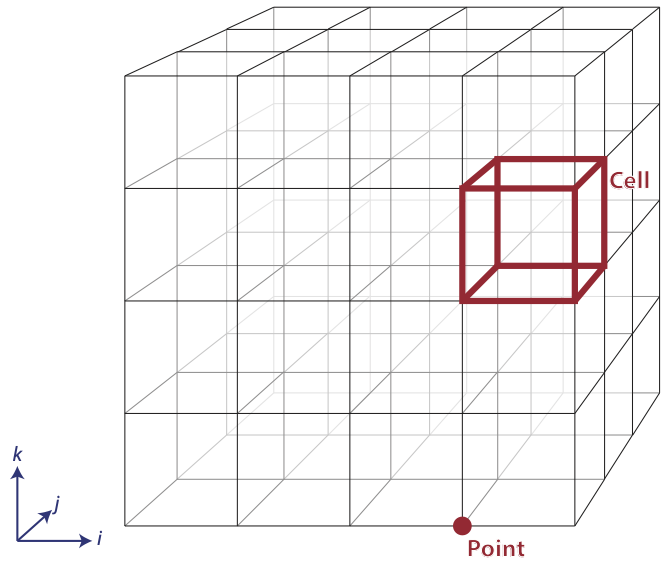
Figure 2.4 The arrangement of points and cells in a 3D structured grid.
The big advantage of using vtkm::cont::CellSetStructured to define a cell set is that it is very space efficient because the entire topology can be defined by the three integers specifying the dimensions.
Also, algorithms can be optimized for vtkm::cont::CellSetStructured’s regular nature.
However, vtkm::cont::CellSetStructured’s strictly regular grid also limits its applicability.
A structured cell set can only be a dense grid of lines, quadrilaterals, or hexahedra.
It cannot represent irregular data well.
Many data models in other software packages, such as the one for VTK, make a distinction between uniform, rectilinear, and curvilinear grids.
VTK‑m’s cell sets do not.
All three of these grid types are represented by vtkm::cont::CellSetStructured.
This is because in a VTK‑m data set the cell set and the coordinate system are defined independently and used interchangeably.
A structured cell set with uniform point coordinates makes a uniform grid.
A structured cell set with point coordinates defined irregularly along coordinate axes makes a rectilinear grid.
And a structured cell set with arbitrary point coordinates makes a curvilinear grid.
The point coordinates are defined by the data set’s coordinate system, which is discussed in Section 2.4.4 (Coordinate Systems).
2.4.2.2. Explicit Cell Sets
-
template<typename ShapesStorageTag = ::vtkm::cont::StorageTagBasic, typename ConnectivityStorageTag = ::vtkm::cont::StorageTagBasic, typename OffsetsStorageTag = ::vtkm::cont::StorageTagBasic>
class CellSetExplicit : public vtkm::cont::CellSet Defines an irregular collection of cells.
The cells can be of different types and connected in arbitrary ways. This is done by explicitly providing for each cell a sequence of points that defines the cell.
Public Functions
-
virtual void PrintSummary(std::ostream &out) const override
Print a summary of this cell set.
-
virtual void ReleaseResourcesExecution() override
Remove the
CellSetfrom any devices.Any memory used on a device to store this object will be deleted. However, the data will still remain on the host.
-
virtual std::shared_ptr<CellSet> NewInstance() const override
Return a new
CellSetthat is the same derived class.
-
virtual void DeepCopy(const CellSet *src) override
Copy the provided
CellSetinto this object.The provided
CellSetmust be the same type as this one.
-
virtual vtkm::IdComponent GetNumberOfPointsInCell(vtkm::Id cellid) const override
Get the number of points incident to a particular cell.
-
virtual void GetCellPointIds(vtkm::Id id, vtkm::Id *ptids) const override
Get a list of points incident to a particular cell.
-
vtkm::cont::ArrayHandle<vtkm::UInt8, ShapesStorageTag>::ReadPortalType ShapesReadPortal() const
Returns an array portal that can be used to get the shape id of each cell.
Using the array portal returned from this method to get many shape ids is likely significantly faster than calling
GetCellShape()for each cell.
-
virtual vtkm::UInt8 GetCellShape(vtkm::Id cellid) const override
Get the shell shape of a particular cell.
-
template<vtkm::IdComponent NumIndices>
void GetIndices(vtkm::Id index, vtkm::Vec<vtkm::Id, NumIndices> &ids) const Retrieves the indices of the points incident to the given cell.
If the provided
vtkm::Vecdoes not have enough components, the result will be truncated.
-
void GetIndices(vtkm::Id index, vtkm::cont::ArrayHandle<vtkm::Id> &ids) const
Retrieves the indices of the points incident to the given cell.
-
void PrepareToAddCells(vtkm::Id numCells, vtkm::Id connectivityMaxLen)
Start adding cells one at a time.
After this method is called,
AddCellis called repeatedly to add each cell. Once all cells are added, callCompleteAddingCells.
-
template<typename IdVecType>
void AddCell(vtkm::UInt8 cellType, vtkm::IdComponent numVertices, const IdVecType &ids) Add a cell.
This can only be called after
AddCell.
-
void Fill(vtkm::Id numPoints, const vtkm::cont::ArrayHandle<vtkm::UInt8, ShapesStorageTag> &cellTypes, const vtkm::cont::ArrayHandle<vtkm::Id, ConnectivityStorageTag> &connectivity, const vtkm::cont::ArrayHandle<vtkm::Id, OffsetsStorageTag> &offsets)
Set all the cells of the mesh.
This method can be used to fill the memory from another system without copying data.
-
template<typename VisitTopology, typename IncidentTopology>
ExecConnectivityType<VisitTopology, IncidentTopology> PrepareForInput(vtkm::cont::DeviceAdapterId device, VisitTopology visitTopology, IncidentTopology incidentTopology, vtkm::cont::Token &token) const Prepares the data for a particular device and returns the execution object for it.
- Parameters:
device – Specifies the device on which the cell set will ve available.
visitTopology – Specifies the “visit” topology element. This is the element that will be indexed in the resulting connectivity object. This is typically
vtkm::TopologyElementTagPointorvtkm::TopologyElementTagCell.incidentTopology – Specifies the “incident” topology element. This is the element that will incident to the elements that are visited. This is typically
vtkm::TopologyElementTagPointorvtkm::TopologyElementTagCell.token – Provides a
vtkm::cont::Tokenobject that will define the span which the return execution object must be valid.
- Returns:
A connectivity object that can be used in the execution environment on the specified device.
-
template<typename VisitTopology, typename IncidentTopology>
const ConnectivityChooser<VisitTopology, IncidentTopology>::ShapesArrayType &GetShapesArray(VisitTopology, IncidentTopology) const Returns the
vtkm::cont::ArrayHandleholding the shape information.The shapes array corresponding to
vtkm::TopologyElementTagCellfor theVisitTopologyandvtkm::TopologyElementTagPointfor theIncidentTopologyis the same as that provided when filling the explicit cell set.ExplicitCellSetis capable of providing the inverse connections (cells incident on each point) on request.
-
template<typename VisitTopology, typename IncidentTopology>
const ConnectivityChooser<VisitTopology, IncidentTopology>::ConnectivityArrayType &GetConnectivityArray(VisitTopology, IncidentTopology) const Returns the
vtkm::cont::ArrayHandlecontaining the connectivity information.Returns the
vtkm::cont::ArrayHandleholding the shape information. The incident array corresponding tovtkm::TopologyElementTagCellfor theVisitTopologyandvtkm::TopologyElementTagPointfor theIncidentTopologyis the same as that provided when filling the explicit cell set.ExplicitCellSetis capable of providing the inverse connections (cells incident on each point) on request.
-
template<typename VisitTopology, typename IncidentTopology>
const ConnectivityChooser<VisitTopology, IncidentTopology>::OffsetsArrayType &GetOffsetsArray(VisitTopology, IncidentTopology) const Returns the
vtkm::cont::ArrayHandlecontaining the offsets into theconnectivity information.Returns the
vtkm::cont::ArrayHandleholding the offset information. The offset array corresponding tovtkm::TopologyElementTagCellfor theVisitTopologyandvtkm::TopologyElementTagPointfor theIncidentTopologyis the same as that provided when filling the explicit cell set.ExplicitCellSetis capable of providing the inverse connections (cells incident on each point) on request.
-
template<typename VisitTopology, typename IncidentTopology>
inline bool HasConnectivity(VisitTopology visit, IncidentTopology incident) const Returns whether the
CellSetExplicithas information for the given visit and incident topology elements.If the connectivity is not available, it will be automatically created if requested, but that will take time.
-
virtual void PrintSummary(std::ostream &out) const override
The types of cell sets are listed in Figure 2.5.
Figure 2.5 Basic Cell Shapes in a vtkm::cont::CellSetExplicit.
An explicit cell set is defined with a minimum of three arrays. The first array identifies the shape of each cell. (Identifiers for cell shapes are shown in Figure 2.5.) The second array has a sequence of point indices that make up each cell. The third array identifies an offset into the second array where the point indices for each cell is found plus an extra entry at the end set to the size of the second array. Figure 2.6 shows a simple example of an explicit cell set.
Figure 2.6 Example of cells in a vtkm::cont::CellSetExplicit and the arrays that define them.
An explicit cell set can also identify the number of indices defined for each cell by subtracting consecutive entries in the offsets array.
It is often the case when creating a vtkm::cont::CellSetExplicit that you have an array containing the number of indices rather than the offsets.
Such an array can be converted to an offsets array that can be used with vtkm::cont::CellSetExplicit by using the vtkm::cont::ConvertNumComponentsToOffsets() convenience function.
See the documentation for vtkm::cont::ArrayHandleGroupVecVariable in Section 4.9.12 (Grouped Vector Arrays) for examples of using vtkm::cont::ConvertNumComponentsToOffsets().
vtkm::cont::CellSetExplicit is a powerful representation for a cell set
because it can represent an arbitrary collection of cells. However, because
all connections must be explicitly defined,
vtkm::cont::CellSetExplicit requires a significant amount of memory to
represent the topology.
An important specialization of an explicit cell set is
vtkm::cont::CellSetSingleType.
-
template<typename ConnectivityStorageTag = ::vtkm::cont::StorageTagBasic>
class CellSetSingleType : public vtkm::cont::CellSetExplicit<vtkm::cont::ArrayHandleConstant<vtkm::UInt8>::StorageTag, ::vtkm::cont::StorageTagBasic, vtkm::cont::ArrayHandleCounting<vtkm::Id>::StorageTag> An explicit cell set with all cells of the same shape.
CellSetSingleTypeis an explicit cell set constrained to contain cells that all have the same shape and all have the same number of points. So, for example if you are creating a surface that you know will contain only triangles,CellSetSingleTypeis a good representation for these data.Using
CellSetSingleTypesaves memory because the array of cell shapes and the array of point counts no longer need to be stored.CellSetSingleTypealso allows VTK-m to skip some processing and other storage required for general explicit cell sets.Public Functions
-
inline void PrepareToAddCells(vtkm::Id numCells, vtkm::Id connectivityMaxLen)
Start adding cells one at a time.
After this method is called,
AddCellis called repeatedly to add each cell. Once all cells are added, callCompleteAddingCells.
-
template<typename IdVecType>
inline void AddCell(vtkm::UInt8 shapeId, vtkm::IdComponent numVertices, const IdVecType &ids) Add a cell.
This can only be called after
AddCell.
-
inline void Fill(vtkm::Id numPoints, vtkm::UInt8 shapeId, vtkm::IdComponent numberOfPointsPerCell, const vtkm::cont::ArrayHandle<vtkm::Id, ConnectivityStorageTag> &connectivity)
Set all the cells of the mesh.
This method can be used to fill the memory from another system without copying data.
-
inline virtual vtkm::UInt8 GetCellShape(vtkm::Id) const override
Get the shell shape of a particular cell.
-
inline virtual std::shared_ptr<CellSet> NewInstance() const override
Return a new
CellSetthat is the same derived class.
-
inline virtual void DeepCopy(const CellSet *src) override
Copy the provided
CellSetinto this object.The provided
CellSetmust be the same type as this one.
-
inline virtual void PrintSummary(std::ostream &out) const override
Print a summary of this cell set.
-
inline void PrepareToAddCells(vtkm::Id numCells, vtkm::Id connectivityMaxLen)
2.4.2.3. Cell Set Permutations
To rearrange, and possibly subsample, cells in a CellSet, use vtkm::cont::CellSetPermutation to define a new set without copying.
-
template<typename OriginalCellSetType_, typename PermutationArrayHandleType_ = vtkm::cont::ArrayHandle<vtkm::Id, ::vtkm::cont::StorageTagBasic>>
class CellSetPermutation : public vtkm::cont::CellSet Rearranges the cells of one cell set to create another cell set.
This restructuring of cells is not done by copying data to a new structure. Rather,
CellSetPermutationestablishes a look-up from one cell structure to another. Cells are permuted on the fly while algorithms are run.A
CellSetPermutationis established by providing a mapping array that for every cell index provides the equivalent cell index in the cell set being permuted.CellSetPermutationis most often used to mask out cells in a data set so that algorithms will skip over those cells when running.Public Functions
-
inline CellSetPermutation(const PermutationArrayHandleType &validCellIds, const OriginalCellSetType &cellset)
Create a
CellSetPermutation.- Parameters:
validCellIds – [in] An array that defines the permutation. If index i is value j, then the ith cell of this cell set will be the same as the jth cell in the original cellset.
cellset – [in] The original cell set that this one is permuting.
-
inline const OriginalCellSetType &GetFullCellSet() const
Returns the original
CellSetthat this one is permuting.
-
inline const PermutationArrayHandleType &GetValidCellIds() const
Returns the array used to permute the cell indices.
-
inline virtual vtkm::Id GetNumberOfPoints() const override
Get the number of points in the topology.
-
inline virtual void ReleaseResourcesExecution() override
Remove the
CellSetfrom any devices.Any memory used on a device to store this object will be deleted. However, the data will still remain on the host.
-
inline virtual vtkm::IdComponent GetNumberOfPointsInCell(vtkm::Id cellIndex) const override
Get the number of points incident to a particular cell.
-
inline virtual vtkm::UInt8 GetCellShape(vtkm::Id id) const override
Get the shell shape of a particular cell.
-
inline virtual void GetCellPointIds(vtkm::Id id, vtkm::Id *ptids) const override
Get a list of points incident to a particular cell.
-
inline virtual std::shared_ptr<CellSet> NewInstance() const override
Return a new
CellSetthat is the same derived class.
-
inline virtual void DeepCopy(const CellSet *src) override
Copy the provided
CellSetinto this object.The provided
CellSetmust be the same type as this one.
-
inline void Fill(const PermutationArrayHandleType &validCellIds, const OriginalCellSetType &cellset)
Set the topology.
- Parameters:
validCellIds – [in] An array that defines the permutation. If index i is value j, then the ith cell of this cell set will be the same as the jth cell in the original cellset.
cellset – [in] The original cell set that this one is permuting.
-
inline ExecConnectivityType<vtkm::TopologyElementTagCell, vtkm::TopologyElementTagPoint> PrepareForInput(vtkm::cont::DeviceAdapterId device, vtkm::TopologyElementTagCell visitTopology, vtkm::TopologyElementTagPoint incidentTopology, vtkm::cont::Token &token) const
Prepares the data for a particular device and returns the execution object for it.
- Parameters:
device – Specifies the device on which the cell set will ve available.
visitTopology – Specifies the “visit” topology element. This is the element that will be indexed in the resulting connectivity object. This is typically
vtkm::TopologyElementTagPointorvtkm::TopologyElementTagCell.incidentTopology – Specifies the “incident” topology element. This is the element that will incident to the elements that are visited. This is typically
vtkm::TopologyElementTagPointorvtkm::TopologyElementTagCell.token – Provides a
vtkm::cont::Tokenobject that will define the span which the return execution object must be valid.
- Returns:
A connectivity object that can be used in the execution environment on the specified device.
-
inline ExecConnectivityType<vtkm::TopologyElementTagPoint, vtkm::TopologyElementTagCell> PrepareForInput(vtkm::cont::DeviceAdapterId device, vtkm::TopologyElementTagPoint visitTopology, vtkm::TopologyElementTagCell incidentTopology, vtkm::cont::Token &token) const
Prepares the data for a particular device and returns the execution object for it.
- Parameters:
device – Specifies the device on which the cell set will ve available.
visitTopology – Specifies the “visit” topology element. This is the element that will be indexed in the resulting connectivity object. This is typically
vtkm::TopologyElementTagPointorvtkm::TopologyElementTagCell.incidentTopology – Specifies the “incident” topology element. This is the element that will incident to the elements that are visited. This is typically
vtkm::TopologyElementTagPointorvtkm::TopologyElementTagCell.token – Provides a
vtkm::cont::Tokenobject that will define the span which the return execution object must be valid.
- Returns:
A connectivity object that can be used in the execution environment on the specified device.
-
inline virtual void PrintSummary(std::ostream &out) const override
Print a summary of this cell set.
-
inline CellSetPermutation(const PermutationArrayHandleType &validCellIds, const OriginalCellSetType &cellset)
Did You Know?
Although vtkm::cont::CellSetPermutation can mask cells, it cannot mask points.
All points from the original cell set are available in the permuted cell set regardless of whether they are used.
The following example uses vtkm::cont::CellSetPermutation with a counting array to expose every tenth cell.
This provides a simple way to subsample a data set.
 1  // Create a simple data set.
 2  vtkm::cont::DataSetBuilderUniform dataSetBuilder;
 3  vtkm::cont::DataSet originalDataSet = dataSetBuilder.Create(vtkm::Id3(33, 33, 26));
 4  vtkm::cont::CellSetStructured<3> originalCellSet;
 5  originalDataSet.GetCellSet().AsCellSet(originalCellSet);
 6
 7  // Create a permutation array for the cells. Each value in the array refers
 8  // to a cell in the original cell set. This particular array selects every
 9  // 10th cell.
10  vtkm::cont::ArrayHandleCounting<vtkm::Id> permutationArray(0, 10, 2560);
11
12  // Create a permutation of that cell set containing only every 10th cell.
13  vtkm::cont::CellSetPermutation<vtkm::cont::CellSetStructured<3>,
14                                 vtkm::cont::ArrayHandleCounting<vtkm::Id>>
15    permutedCellSet(permutationArray, originalCellSet);
2.4.2.4. Cell Set Extrude
-
class CellSetExtrude : public vtkm::cont::CellSet
Defines a 3-dimensional extruded mesh representation.
CellSetExtrudetakes takes a mesh defined in the XZ-plane and extrudes it along the Y-axis. This plane is repeated in a series of steps and forms wedge cells between them.The extrusion can be linear or rotational (e.g., to form a torus).
Public Functions
-
virtual vtkm::UInt8 GetCellShape(vtkm::Id id) const override
Get the shell shape of a particular cell.
-
virtual vtkm::IdComponent GetNumberOfPointsInCell(vtkm::Id id) const override
Get the number of points incident to a particular cell.
-
virtual void GetCellPointIds(vtkm::Id id, vtkm::Id *ptids) const override
Get a list of points incident to a particular cell.
-
virtual std::shared_ptr<CellSet> NewInstance() const override
Return a new
CellSetthat is the same derived class.
-
virtual void DeepCopy(const CellSet *src) override
Copy the provided
CellSetinto this object.The provided
CellSetmust be the same type as this one.
-
virtual void PrintSummary(std::ostream &out) const override
Print a summary of this cell set.
-
virtual vtkm::UInt8 GetCellShape(vtkm::Id id) const override

Figure 2.7 An example of an extruded wedge from XZ-plane coordinates. Six wedges are extracted from three XZ-plane points.
The extruded mesh is advantageous because it is represented on-the-fly as required, so no additional memory is required.
In contrast other forms of cell sets, such as vtkm::cont::CellSetExplicit, need to be explicitly constructed by replicating the vertices and cells.
Figure 2.7 shows an example of six wedges extruded from three 2-dimensional coordinates.
2.4.2.5. Unknown Cell Sets
Each of the aforementioned cell set types are represented by a different class.
A vtkm::cont::DataSet object must hold one of these cell set objects that represent the cell structure.
The actual object used is not determined until run time.
The vtkm::cont::DataSet object manages the cell set object with vtkm::cont::UnknownCellSet.
When you call vtkm::cont::DataSet::GetCellSet(), it returns a vtkm::cont::UnknownCellSet.
The vtkm::cont::UnknownCellSet object provides mechanisms to query the cell set, identify its type, and cast it to one of the concrete CellSet types.
See Chapter ref{chap:UnknownCellSet} for details on working with vtkm::cont::UnknownCellSet.
2.4.3. Fields
A field on a data set provides a value on every point in space on the mesh. Fields are often used to describe physical properties such as pressure, temperature, mass, velocity, and much more. Fields are represented in a VTK‑m data set as an array where each value is associated with a particular element type of a mesh (such as points or cells). This association of field values to mesh elements and the structure of the cell set determines how the field is interpolated throughout the space of the mesh.
2.4.3.1. Field Class
Fields are manged by the vtkm::cont::Field class.
-
class Field
A
Fieldencapsulates an array on some piece of the mesh, such as the points, a cell set, a point logical dimension, or the whole mesh.Subclassed by vtkm::cont::CoordinateSystem
Fields are identified by a simple name string.
The vtkm::cont::Field object internally holds a reference to an array in a type-agnostic way.
Filters and other VTK‑m units will determine the type of the array and pull it out of the vtkm::cont::Field.
-
const vtkm::cont::UnknownArrayHandle &vtkm::cont::Field::GetData() const
Get the array of the data for the field.
The field data is associated with a particular type of element of a mesh such as points, cells, or the whole mesh.
-
inline Association vtkm::cont::Field::GetAssociation() const
Return the association of the field.
Associations are identified by the vtkm::cont::Field::Association enumeration.
-
enum class vtkm::cont::Field::Association
Identifies what elements of a data set a field is associated with.
The
Associationenum is used byvtkm::cont::Fieldto specify on what topological elements each item in the field is associated with.Values:
-
enumerator Any
Any field regardless of the association.
This is used when choosing a
vtkm::cont::Fieldthat could be of any association. It is often used as the default if no association is given.
-
enumerator WholeDataSet
A “global” field that applies to the entirety of a
vtkm::cont::DataSet.Fields of this association often contain summary or annotation information. An example of a whole data set field could be the region that the mesh covers.
-
enumerator Points
A field that applies to points.
There is a separate field value attached to each point. Point fields usually represent samples of continuous data that can be reinterpolated through cells. Physical properties such as temperature, pressure, density, velocity, etc. are usually best represented in point fields. Data that deals with the points of the topology, such as displacement vectors, are also appropriate for point data.
-
enumerator Cells
A field that applies to cells.
There is a separate field value attached to each cell in a cell set. Cell fields usually represent values from an integration over the finite cells of the mesh. Integrated values like mass or volume are best represented in cell fields. Statistics about each cell like strain or cell quality are also appropriate for cell data.
-
enumerator Partitions
A field that applies to partitions.
This type of field is attached to a
vtkm::cont::PartitionedDataSet. There is a separate field value attached to each partition. Identification or information about the arrangement of partitions such as hierarchy levels are usually best represented in partition fields.
-
enumerator Global
A field that applies to all partitions.
This type of field is attached to a
vtkm::cont::PartitionedDataSet. It contains values that are “global” across all partitions and data therin.
-
enumerator Any
A vtkm::cont::Field class can be constructed by providing the name, association and data.
-
vtkm::cont::Field::Field(std::string name, Association association, const vtkm::cont::UnknownArrayHandle &data)
Create a field with the given name, association, and data.
The vtkm::cont::Field class also has several convenience methods for querying the association.
-
inline bool vtkm::cont::Field::IsPointField() const
Return true if this field is associated with points.
-
inline bool vtkm::cont::Field::IsCellField() const
Return true if this field is associated with cells.
-
inline bool vtkm::cont::Field::IsWholeDataSetField() const
Return true if this field is associated with the whole data set.
-
inline bool vtkm::cont::Field::IsPartitionsField() const
Return true if this field is associated with partitions in a partitioned data set.
-
inline bool vtkm::cont::Field::IsGlobalField() const
Return true if this field is global.
A global field is applied to a
vtkm::cont::PartitionedDataSetto refer to data that applies across an entire collection of data.
vtkm::cont::Field has a convenience method named vtkm::cont::Field::GetRange() that finds the range of values stored in the field array.
-
const vtkm::cont::ArrayHandle<vtkm::Range> &vtkm::cont::Field::GetRange() const
Returns the range of each component in the field array.
The ranges of each component are returned in an
ArrayHandlecontainingvtkm::Rangevalues. So, for example, callingGetRangeon a scalar field will return anArrayHandlewith exactly 1 entry in it. CallingGetRangeon a field of 3D vectors will return anArrayHandlewith exactly 3 entries corresponding to each of the components in the range.
Did You Know?
The vtkm::cont::Field class does not give direct access to the data in the field.
This is in part because the field can hold any number of data types and in part because data access is more efficient in filters and other features that run in parallel.
The vtkm::cont::Field::PrintSummary() function can be used to get some summary information for debugging.
To get direct access to the data, you will first have to get a vtkm::cont::UnknownArrayHandle from vtkm::cont::Field::Data().
The vtkm::cont::UnknownArrayHandle then has to be converted to a vtkm::cont::ArrayHandle of the proper type as described in Chapter 3.5 (Unknown Array Handles).
Once the proper vtkm::cont::ArrayHandle is retrieved, the data can finally be accessed through an array portal as described in Section 3.2.4 (Array Portals).
2.4.3.2. Managing Data Set Fields
Section 2.4.1.4 (Add Fields) describes the convenient vtkm::cont::DataSet::AddPointField() and vtkm::cont::DataSet::AddCellField() methods for adding fields to a vtkm::cont::DataSet from an array.
Fields can be added more generally by passing a vtkm::cont::Field object or by providing a vtkm::cont::Field::Association.
-
void vtkm::cont::DataSet::AddField(const Field &field)
Adds a field to the
DataSet.Note that the indexing of fields is not the same as the order in which they are added, and that adding a field can arbitrarily reorder the integer indexing of all the fields. To retrieve a specific field, retrieve the field by name, not by integer index.
-
void vtkm::cont::DataSet::AddField(const std::string &name, vtkm::cont::Field::Association association, const vtkm::cont::UnknownArrayHandle &data)
Adds a field to the
DataSet.Note that the indexing of fields is not the same as the order in which they are added, and that adding a field can arbitrarily reorder the integer indexing of all the fields. To retrieve a specific field, retrieve the field by name, not by integer index.
A vtkm::cont::Field can be retrieved from a vtkm::cont::DataSet by name and an optional association.
-
inline const vtkm::cont::Field &vtkm::cont::DataSet::GetField(const std::string &name, vtkm::cont::Field::Association assoc = vtkm::cont::Field::Association::Any) const
Returns the field that matches the provided name and association.
This method will throw an exception if no match is found. Use
HasField()to query whether a particular field exists.
-
inline vtkm::cont::Field &vtkm::cont::DataSet::GetField(const std::string &name, vtkm::cont::Field::Association assoc = vtkm::cont::Field::Association::Any)
Returns the field that matches the provided name and association.
This method will throw an exception if no match is found. Use
HasField()to query whether a particular field exists.
-
inline const vtkm::cont::Field &vtkm::cont::DataSet::GetPointField(const std::string &name) const
Returns the first point field that matches the provided name.
This method will throw an exception if no match is found. Use
HasPointField()to query whether a particular field exists.
-
inline vtkm::cont::Field &vtkm::cont::DataSet::GetPointField(const std::string &name)
Returns the first point field that matches the provided name.
This method will throw an exception if no match is found. Use
HasPointField()to query whether a particular field exists.
-
inline const vtkm::cont::Field &vtkm::cont::DataSet::GetCellField(const std::string &name) const
Returns the first cell field that matches the provided name.
This method will throw an exception if no match is found. Use
HasCellField()to query whether a particular field exists.
-
inline vtkm::cont::Field &vtkm::cont::DataSet::GetCellField(const std::string &name)
Returns the first cell field that matches the provided name.
This method will throw an exception if no match is found. Use
HasCellField()to query whether a particular field exists.
The number of fields in a vtkm::cont::DataSet is returned by vtkm::cont::DataSet::GetNumberOfFields().
-
inline vtkm::IdComponent vtkm::cont::DataSet::GetNumberOfFields() const
It is possible to iterate over all fields of a vtkm::cont::DataSet by quering the number of fields and then retrieving the fields by index.
-
inline const vtkm::cont::Field &vtkm::cont::DataSet::GetField(vtkm::Id index) const
Retrieves a field by index.
Note that the indexing of fields is not the same as the order in which they are added, and that adding a field can arbitrarily reorder the integer indexing of all the fields. To retrieve a specific field, retrieve the field by name, not by integer index. This method is most useful for iterating over all the fields of a
DataSet(indexed from0toNumberOfFields() - 1).
-
inline vtkm::cont::Field &vtkm::cont::DataSet::GetField(vtkm::Id index)
Retrieves a field by index.
Note that the indexing of fields is not the same as the order in which they are added, and that adding a field can arbitrarily reorder the integer indexing of all the fields. To retrieve a specific field, retrieve the field by name, not by integer index. This method is most useful for iterating over all the fields of a
DataSet(indexed from0toNumberOfFields() - 1).
1  std::cout << "Fields in data:";
2  for (vtkm::IdComponent fieldId = 0; fieldId < dataSet.GetNumberOfFields(); ++fieldId)
3  {
4    vtkm::cont::Field field = dataSet.GetField(fieldId);
5    std::cout << " " << field.GetName();
6  }
7  std::cout << std::endl;
Common Errors
Avoid retrieving fields by index unless doing simple iterations like this.
The ordering of the fields can change so under some circumstances you may get different vtkm::cont::Field objects for the same index.
vtkm::cont::DataSet::GetField() and the related methods will throw an exception if the vtkm::cont::DataSet does not contain the requested field.
You can test whether a vtkm::cont::DataSet has a field without having an exception thrown using one of the variations of vtkm::cont::DataSet::HasField().
-
inline bool vtkm::cont::DataSet::HasField(const std::string &name, vtkm::cont::Field::Association assoc = vtkm::cont::Field::Association::Any) const
2.4.4. Coordinate Systems
A coordinate system determines the location of a mesh’s elements in space. The spatial location is described by providing a 3D vector at each point that gives the coordinates there. The point coordinates can then be interpolated throughout the mesh.
2.4.4.1. Coordinate System Class
Coordinate systems are managed by vtkm::cont::CoordinateSystem, which is a subclass of vtkm::cont::Field.
This is because a coordinate system is conceptually just a field with some special properties.
-
class CoordinateSystem : public vtkm::cont::Field
Manages a coordinate system for a
DataSet.A coordinate system is really a field with a special meaning, so
CoordinateSystemclass inherits from theFieldclass.CoordinateSystemconstrains the field to be associated with points and typically has 3D floating point vectors for values.
Because a vtkm::cont::CoordinateSystem is a field that is always associated with points, it can be constructed with just the name and the data.
-
vtkm::cont::CoordinateSystem::CoordinateSystem(std::string name, const vtkm::cont::UnknownArrayHandle &data)
vtkm::cont::CoordinateSystem also has a convenience constructor for creating a uniform mesh of points.
-
vtkm::cont::CoordinateSystem::CoordinateSystem(std::string name, vtkm::Id3 dimensions, vtkm::Vec3f origin = vtkm::Vec3f(0.0f, 0.0f, 0.0f), vtkm::Vec3f spacing = vtkm::Vec3f(1.0f, 1.0f, 1.0f))
This constructor of coordinate system sets up a regular grid of points.
In addition to all the methods provided by the vtkm::cont::Field superclass, the vtkm::cont::CoordinateSystem also provides a vtkm::cont::CoordinateSystem::GetBounds() convenience method that returns a vtkm::Bounds object giving the spatial bounds of the coordinate system.
-
inline vtkm::Bounds vtkm::cont::CoordinateSystem::GetBounds() const
2.4.4.2. Managing Data Set Coordinate Systems
It is typical for a vtkm::cont::DataSet to have one coordinate system defined, but it is possible to define multiple coordinate systems.
This is helpful when there are multiple ways to express coordinates.
For example, planetary positions may be expressed as Cartesian coordinates or as latitude-longitude coordinates.
Both are valid and useful in different ways.
It is also valid to have a vtkm::cont::DataSet with no coordinate system.
This is useful when the structure is not rooted in physical space.
For example, if the cell set is representing a graph structure, there might not be any physical space that has meaning for the graph.
Similar to regular fields, coordinate systems can be added to a vtkm::cont::DataSet by either constructing a vtkm::cont::CoordinateSystem or by providing the array and field information.
-
vtkm::IdComponent vtkm::cont::DataSet::AddCoordinateSystem(const vtkm::cont::CoordinateSystem &cs)
Adds the given
CoordinateSystemto theDataSet.The coordinate system will also be added as a point field of the same name.
- Returns:
the field index assigned to the added coordinate system.
-
vtkm::IdComponent vtkm::cont::DataSet::AddCoordinateSystem(const std::string &name, const vtkm::cont::UnknownArrayHandle &data)
Adds a
CoordinateSystemwith the given name and data.The coordinate system will also be added as a point field of the same name.
- Returns:
the field index assigned to the added coordinate system.
Because coordinate systems are part of the list of fields, an existing point field can be marked as a coordinate system by just providing its name.
-
vtkm::IdComponent vtkm::cont::DataSet::AddCoordinateSystem(const std::string &pointFieldName)
Marks the point field with the given name as a coordinate system.
If no such point field exists or the point field is of the wrong format, an exception will be throw.
- Returns:
the field index assigned to the added coordinate system.
A vtkm::cont::CoordinateSystem can be retrieved from a vtkm::cont::DataSet by name.
-
vtkm::cont::CoordinateSystem vtkm::cont::DataSet::GetCoordinateSystem(const std::string &name) const
Returns the CoordinateSystem that matches the provided name.
Will throw an exception if no match is found
vtkm::cont::DataSet::GetCoordianteSystem() will throw an exception if the vtkm::cont::DataSet does not contain the requested field.
You can test whether a vtkm::cont::DataSet has a field without having an exception thrown by using vtkm::cont::DataSet::HasCoordinateSystem().
Coordiante systems can also be retrieved by index.
Because most DataSet’s contain exactly one coordiante system, it is common to pick the coordinate system at index 0, which is the default argument.
-
vtkm::cont::CoordinateSystem vtkm::cont::DataSet::GetCoordinateSystem(vtkm::Id index = 0) const
It is also possible to iterate over all coordinate systems by retrieving the number of coordinate systems.
-
inline vtkm::IdComponent vtkm::cont::DataSet::GetNumberOfCoordinateSystems() const
2.4.5. Partitioned Data Sets
-
class PartitionedDataSet
Comprises a set of
vtkm::cont::DataSetobjects.Iterators
PartitionedDataSetprovides an iterator interface that allows you to iterate over the contained partitions using thefor (auto ds : pds)syntax.Public Functions
-
PartitionedDataSet(const vtkm::cont::DataSet &ds)
Create a new PartitionedDataSet containng a single DataSet ds.
-
explicit PartitionedDataSet(const std::vector<vtkm::cont::DataSet> &partitions)
Create a new PartitionedDataSet with a DataSet vector partitions.
-
explicit PartitionedDataSet(vtkm::Id size)
Create a new PartitionedDataSet with the capacity set to be size.
-
vtkm::cont::Field GetFieldFromPartition(const std::string &field_name, int partition_index) const
Get the field field_name from partition partition_index.
-
vtkm::Id GetNumberOfPartitions() const
Get number of DataSet objects stored in this PartitionedDataSet.
-
vtkm::Id GetGlobalNumberOfPartitions() const
Get number of partations across all MPI ranks.
Warning
This method requires global communication (MPI_Allreduce) if MPI is enabled.
-
const std::vector<vtkm::cont::DataSet> &GetPartitions() const
Get an STL vector of all DataSet objects stored in PartitionedDataSet.
-
void AppendPartition(const vtkm::cont::DataSet &ds)
Add DataSet ds to the end of the list of partitions.
-
void InsertPartition(vtkm::Id index, const vtkm::cont::DataSet &ds)
Add DataSet ds to position index of the contained DataSet vector.
All partitions at or after this location are pushed back.
-
void ReplacePartition(vtkm::Id index, const vtkm::cont::DataSet &ds)
Replace the index positioned element of the contained DataSet vector with ds.
-
void AppendPartitions(const std::vector<vtkm::cont::DataSet> &partitions)
Append the DataSet vector partitions to the end of list of partitions.
This list can be provided as a
std::vector, or it can be an initializer list (declared in{ }curly braces).
-
inline vtkm::IdComponent GetNumberOfFields() const
Methods to Add and Get fields on a PartitionedDataSet.
-
inline void AddField(const Field &field)
Adds a field that is applied to the meta-partition structure.
The
fieldmust have an association that applies across all partitions.
-
inline void AddField(const std::string &name, vtkm::cont::Field::Association association, const vtkm::cont::UnknownArrayHandle &data)
Adds a field that is applied to the meta-partition structure.
The
fieldmust have an association that applies across all partitions.
-
template<typename T, typename Storage>
inline void AddGlobalField(const std::string &fieldName, const vtkm::cont::ArrayHandle<T, Storage> &field) Add a field with a global association.
-
template<typename T, typename Storage>
inline void AddPartitionsField(const std::string &fieldName, const vtkm::cont::ArrayHandle<T, Storage> &field) Add a field where each entry is associated with a whole partition.
-
inline vtkm::cont::Field &GetField(const std::string &name, vtkm::cont::Field::Association assoc = vtkm::cont::Field::Association::Any)
Get a field associated with the partitioned data structure.
The field is selected by name and, optionally, the association.
-
inline const vtkm::cont::Field &GetPartitionsField(const std::string &name) const
Get a field associated with the partitions.
-
inline bool HasField(const std::string &name, vtkm::cont::Field::Association assoc = vtkm::cont::Field::Association::Any) const
Query whether the partitioned data set has the named field.
-
inline bool HasGlobalField(const std::string &name) const
Query whether the partitioned data set has the named global field.
-
inline bool HasPartitionsField(const std::string &name) const
Query whether the partitioned data set has the named partition field.
-
void CopyPartitions(const vtkm::cont::PartitionedDataSet &source)
Copies the partitions from the source. The fields on the PartitionedDataSet are not copied.
-
PartitionedDataSet(const vtkm::cont::DataSet &ds)
The following example creates a vtkm::cont::PartitionedDataSet containing two uniform grid data sets.
1  // Create two uniform data sets
2  vtkm::cont::DataSetBuilderUniform dataSetBuilder;
3
4  vtkm::cont::DataSet dataSet1 = dataSetBuilder.Create(vtkm::Id3(10, 10, 10));
5  vtkm::cont::DataSet dataSet2 = dataSetBuilder.Create(vtkm::Id3(30, 30, 30));
6
7  // Add the datasets to a multi block
8  vtkm::cont::PartitionedDataSet partitionedData;
9  partitionedData.AppendPartitions({ dataSet1, dataSet2 });
It is always possible to retrieve the independent blocks in a vtkm::cont::PartitionedDataSet, from which you can iterate and get information about the data.
However, VTK‑m provides several helper functions to collect metadata information about the collection as a whole.
-
vtkm::Bounds vtkm::cont::BoundsCompute(const vtkm::cont::DataSet &dataset, vtkm::Id coordinate_system_index = 0)
Functions to compute bounds for a single dataSset or partition dataset.
These are utility functions that compute bounds for a single dataset or partitioned dataset. When VTK-m is operating in an distributed environment, these are bounds on the local process. To get global bounds across all ranks, use
vtkm::cont::BoundsGlobalComputeinstead.Note that if the provided CoordinateSystem does not exists, empty bounds are returned. Likewise, for PartitionedDataSet, partitions without the chosen CoordinateSystem are skipped.
-
vtkm::Bounds vtkm::cont::BoundsCompute(const vtkm::cont::PartitionedDataSet &pds, vtkm::Id coordinate_system_index = 0)
-
vtkm::Bounds vtkm::cont::BoundsCompute(const vtkm::cont::DataSet &dataset, const std::string &coordinate_system_name)
-
vtkm::Bounds vtkm::cont::BoundsCompute(const vtkm::cont::PartitionedDataSet &pds, const std::string &coordinate_system_name)
-
vtkm::Bounds vtkm::cont::BoundsGlobalCompute(const vtkm::cont::DataSet &dataset, vtkm::Id coordinate_system_index = 0)
Functions to compute bounds for a single dataset or partitioned dataset globally.
These are utility functions that compute bounds for a single dataset or partitioned dataset globally i.e. across all ranks when operating in a distributed environment. When VTK-m not operating in an distributed environment, these behave same as
vtkm::cont::BoundsCompute.Note that if the provided CoordinateSystem does not exists, empty bounds are returned. Likewise, for PartitionedDataSet, partitions without the chosen CoordinateSystem are skipped.
-
vtkm::Bounds vtkm::cont::BoundsGlobalCompute(const vtkm::cont::PartitionedDataSet &pds, vtkm::Id coordinate_system_index = 0)
-
vtkm::Bounds vtkm::cont::BoundsGlobalCompute(const vtkm::cont::DataSet &dataset, const std::string &coordinate_system_name)
-
vtkm::Bounds vtkm::cont::BoundsGlobalCompute(const vtkm::cont::PartitionedDataSet &pds, const std::string &coordinate_system_name)
-
vtkm::cont::ArrayHandle<vtkm::Range> vtkm::cont::FieldRangeCompute(const vtkm::cont::DataSet &dataset, const std::string &name, vtkm::cont::Field::Association assoc = vtkm::cont::Field::Association::Any)
Compute ranges for fields in a DataSet or PartitionedDataSet.
These methods to compute ranges for fields in a single dataset or a partitioned dataset. When using VTK-m in a hybrid-parallel environment with distributed processing, this class uses ranges for locally available data alone. Use FieldRangeGlobalCompute to compute ranges globally across all ranks even in distributed mode. Returns the range for a field from a dataset. If the field is not present, an empty ArrayHandle will be returned.
-
vtkm::cont::ArrayHandle<vtkm::Range> vtkm::cont::FieldRangeCompute(const vtkm::cont::PartitionedDataSet &pds, const std::string &name, vtkm::cont::Field::Association assoc = vtkm::cont::Field::Association::Any)
Returns the range for a field from a PartitionedDataSet.
If the field is not present on any of the partitions, an empty ArrayHandle will be returned. If the field is present on some partitions, but not all, those partitions without the field are skipped.
The returned array handle will have as many values as the maximum number of components for the selected field across all partitions.
-
vtkm::cont::ArrayHandle<vtkm::Range> vtkm::cont::FieldRangeGlobalCompute(const vtkm::cont::DataSet &dataset, const std::string &name, vtkm::cont::Field::Association assoc = vtkm::cont::Field::Association::Any)
utility functions to compute global ranges for dataset fields.
These functions compute global ranges for fields in a single DataSet or a PartitionedDataSet. In non-distributed environments, this is exactly same as
FieldRangeCompute. In distributed environments, however, the range is computed locally on each rank and then a reduce-all collective is performed to reduces the ranges on all ranks. Returns the range for a field from a dataset. If the field is not present, an empty ArrayHandle will be returned.
-
vtkm::cont::ArrayHandle<vtkm::Range> vtkm::cont::FieldRangeGlobalCompute(const vtkm::cont::PartitionedDataSet &pds, const std::string &name, vtkm::cont::Field::Association assoc = vtkm::cont::Field::Association::Any)
Returns the range for a field from a PartitionedDataSet.
If the field is not present on any of the partitions, an empty ArrayHandle will be returned. If the field is present on some partitions, but not all, those partitions without the field are skipped.
The returned array handle will have as many values as the maximum number of components for the selected field across all partitions.
The following example illustrates a spatial bounds query and a field range query on a vtkm::cont::PartitionedDataSet.
1  // Get the bounds of a multi-block data set
2  vtkm::Bounds bounds = vtkm::cont::BoundsCompute(partitionedData);
3
4  // Get the overall min/max of a field named "cellvar"
5  vtkm::cont::ArrayHandle<vtkm::Range> cellvarRanges =
6    vtkm::cont::FieldRangeCompute(partitionedData, "cellvar");
7
8  // Assuming the "cellvar" field has scalar values, then cellvarRanges has one entry
9  vtkm::Range cellvarRange = cellvarRanges.ReadPortal().Get(0);
Did You Know?
The aforementioned functions for querying a vtkm::cont::PartitionedDataSet object also work on vtkm::cont::DataSet objects.
This is particularly useful with the vtkm::cont::BoundsGlobalCompute() and vtkm::cont::FieldRangeGlobalCompute() functions to manage distributed parallel objects.
Filters can be executed on vtkm::cont::PartitionedDataSet objects in a similar way they are executed on vtkm::cont::DataSet objects.
In both cases, the vtkm::cont::Filter::Execute() method is called on the filter giving data object as an argument.
1  vtkm::filter::field_conversion::CellAverage cellAverage;
2  cellAverage.SetActiveField("pointvar", vtkm::cont::Field::Association::Points);
3
4  vtkm::cont::PartitionedDataSet results = cellAverage.Execute(partitionedData);
2.4.6. Cell Classification and Ghost Cells
One of the challenges of managing data that is divided into partitions, such as in a vtkm::cont::PartitionedDataSet or across MPI ranks, is dealing with the boundary between partitions.
A cell on the boundary on one partition will not have the connection information to an adjacent cell in a neighboring partition.
This can cause a problem with many of the filtering operations in VTK‑m that operate on each partition independently.
A simple remedy to many of the issues with this missing connectivity information is the introduction of ghost cells (sometimes also known as halo cells).
A ghost cell is one that is included in a vtkm::cont::DataSet, but should not be considered part of the partition.
It is assumed a ghost cell can be removed from the data as it is repeated information.
However, it is provided so that algorithms using information across cell neighbors will get that information.
There exist some filters in VTK‑m to manipulate ghost cells such as those described in Section 2.7.5.5 (Ghost Cell Removal), Section 2.7.10.2 (Ghost Cell Classification), and Section 2.7.11.1 (AMR Arrays). The following operations document how to add and use ghost cell information.
2.4.6.1. Ghost Cell Fields
Each vtkm::cont::DataSet can contain a special cell field that provides for each cell a flag identifying the cell as normal, ghost, or other properties.
-
vtkm::cont::Field vtkm::cont::DataSet::GetGhostCellField() const
Returns the cell field that matches the ghost cell field name.
This method will return a constant array of zeros if no match is found. Use
HasGhostCellField()to query whether a particular field exists.
-
void vtkm::cont::DataSet::SetGhostCellField(const vtkm::cont::Field &field)
Sets the ghost cell levels.
A field of the given name is added to the
DataSet, and that field is set as the cell ghost levels.Note that the indexing of fields is not the same as the order in which they are added, and that adding a field can arbitrarily reorder the integer indexing of all the fields. To retrieve a specific field, retrieve the field by name, not by integer index.
-
void vtkm::cont::DataSet::SetGhostCellField(const std::string &fieldName, const vtkm::cont::UnknownArrayHandle &field)
Sets the ghost cell levels.
A field of the given name is added to the
DataSet, and that field is set as the cell ghost levels.Note that the indexing of fields is not the same as the order in which they are added, and that adding a field can arbitrarily reorder the integer indexing of all the fields. To retrieve a specific field, retrieve the field by name, not by integer index.
Like coordinate systems, ghost cell fields are stored with the list of all fields within a vtkm::cont::DataSet and are identified by the name of the field.
So, the ghost cell field can be specified by providing the name of an existing field.
-
void vtkm::cont::DataSet::SetGhostCellField(const std::string &name)
Sets the cell field of the given name as the cell ghost levels.
If a cell field of the given name does not exist, an exception is thrown.
The name of the field used for ghost cells is set independently of the field.
-
void vtkm::cont::DataSet::SetGhostCellFieldName(const std::string &name)
Sets the name of the field to use for cell ghost levels.
This value can be set regardless of whether such a cell field actually exists.
The vtkm::cont::DataSet may name a ghost cell field that does not exist.
In this case, vtkm::cont::DataSet::HasGhostCellField() will report no ghost cell field, but the name will still exist.
If a cell field with this name is later added to the vtkm::cont::DataSet, it will automatically become the ghost cell field.
Likewise, because the name of the ghost cell field already exists, a ghost cell field can be created by just providing the array without the name.
-
void vtkm::cont::DataSet::SetGhostCellField(const vtkm::cont::UnknownArrayHandle &field)
Sets the ghost cell levels to the given array.
A field with the global ghost cell field name (see
GlobalGhostCellFieldName) is added to theDataSetand made to be the cell ghost levels.Note that the indexing of fields is not the same as the order in which they are added, and that adding a field can arbitrarily reorder the integer indexing of all the fields. To retrieve a specific field, retrieve the field by name, not by integer index.
VTK‑m also specifies a “global” cell field name.
All vtkm::cont::DataSet objects will be born with this global cell field name.
-
const std::string &vtkm::cont::GetGlobalGhostCellFieldName() noexcept
-
void vtkm::cont::SetGlobalGhostCellFieldName(const std::string &name) noexcept
This global cell field name makes it easier to work with other libraries or data sources that have a particular naming convention for ghost cells.
Did You Know?
The default global ghost cell name is vtkGhostCells.
This follows the convention of the VTK visualization library.
2.4.6.2. Cell Classification Flags
The ghost cell field is typically a field of vtkm::UInt8 values.
Each value is treated as bit flags specifying the classification of the cell.
The interpretation of the ghost cell field flags is determined by vtkm::CellClassification.
-
class CellClassification
Bit flags used in ghost arrays to identify what type a cell is.
CellClassificationcontains several bit flags that determine whether a cell is normal or if it should be treated as duplicated or removed in some way. The flags can be (and should be) treated asvtkm::UInt8and or-ed together.
vtkm::CellClassification behaves like a scoped enum, but values of type vtkm::CellClassification can be used interchangeably with vtkm::UInt8.
This simplifies working with classification flags.
Valid classification flags can be the or-ing of any of the following flags.
-
enumerator Normal
Value used for a normal cell.
This value is the clearing of any cell classification flags. This identifies the cells as a “normal” cell without any special or exclusionary properties.
-
enumerator Ghost
Flag used for a ghost cell.
This flag indicates the associated cell is repeated information from a different partition. The ghost cell is provided to give data from cells in neighboring partitions. This allows operations to correctly compute neighborhood information without explicit communications. Ghost cells are typically removed for rendering.
-
enumerator Invalid
Flag used for an invalid cell.
-
enumerator Blanked
Flag used for a cell that should not be considered part of the data.
A blanked cell should be ignored from the data. Cells with this flag should be treated as if they were not declared. Blanked cells are primarily used in structured cell sets to remove parts of the interior of the mesh volume that could not otherwise be removed. Blanked cells are common in AMR structures to indicate cells that are further refined in deeper levels.
Did You Know?
Like the default ghost cell field name, the vtkm::CellClassification flags follow the same flags used in the VTK library.
This allows data to be more easily imported between the two libraries.
 1struct SetGhostCells : vtkm::worklet::WorkletCellNeighborhood
 2{
 3  using ControlSignature = void(CellSetIn cellSet,
 4                                WholeArrayIn blankedRegions,
 5                                FieldOut ghostCells);
 6  using ExecutionSignature = _3(_2, Boundary);
 7
 8  template<typename BlankedRegionsPortal>
 9  VTKM_EXEC vtkm::UInt8 operator()(const BlankedRegionsPortal& blankedRegions,
10                                   const vtkm::exec::BoundaryState& location) const
11  {
12    vtkm::UInt8 cellClassification = vtkm::CellClassification::Normal;
13
14    // Mark cells at boundary as ghost cells.
15    if (!location.IsRadiusInBoundary(1))
16    {
17      cellClassification |= vtkm::CellClassification::Ghost;
18    }
19
20    // Mark cells inside specified regions as blanked.
21    for (vtkm::Id brIndex = 0; brIndex < blankedRegions.GetNumberOfValues(); ++brIndex)
22    {
23      vtkm::RangeId3 blankedRegion = blankedRegions.Get(brIndex);
24      if (blankedRegion.Contains(location.GetCenterIndex()))
25      {
26        cellClassification |= vtkm::CellClassification::Blanked;
27      }
28    }
29
30    return cellClassification;
31  }
32};
33
34void MakeGhostCells(vtkm::cont::DataSet& dataset,
35                    const std::vector<vtkm::RangeId3> blankedRegions)
36{
37  vtkm::cont::Invoker invoke;
38  vtkm::cont::ArrayHandle<vtkm::UInt8> ghostCells;
39
40  invoke(SetGhostCells{},
41         dataset.GetCellSet(),
42         vtkm::cont::make_ArrayHandle(blankedRegions, vtkm::CopyFlag::Off),
43         ghostCells);
44
45  dataset.SetGhostCellField(ghostCells);
46}